Blocks, Workflows, and Agents
Learn the simple, composable patterns that successful teams use to build effective agentic systems in production.
What We've Learned
After working with dozens of teams building LLM agents across industries, one pattern emerges consistently: the most successful implementations use simple, composable patterns rather than complex frameworks.
Over the past year, we've helped teams build agents for coding, search, analysis, customer support, and more. The teams that moved fastest weren't the ones with the most sophisticated frameworks—they were the ones who understood the core patterns and built incrementally. This guide shares what we've learned.
Workflows vs. Agents
The distinction is fundamental to choosing the right approach.
📋 Workflows
LLMs and tools orchestrated through predefined code paths. You define the sequence upfront.
✓ Predictable
✓ Efficient
✓ Debuggable
🤖 Agents
LLMs dynamically direct their own processes and tool usage. The path emerges from reasoning.
✓ Flexible
✓ Model-driven
✓ Autonomous
The tradeoff
Workflows trade flexibility for predictability. Agents trade cost and latency for flexibility. Choose based on your problem, not hype.
When to Use What
Start simple
Before building workflows or agents, try optimizing a single LLM call. Add retrieval, use good examples, refine your prompts. This solves more problems than you'd expect.
Use workflows when
- The task decomposes into clear, fixed steps
- You need predictability and consistency
- Latency matters (no loops)
- You can hardcode the happy path
Use agents when
- The number of steps or path is unpredictable
- You need flexibility and autonomy
- The model's reasoning is valuable
- You can tolerate higher costs for better results
Building Block: The Augmented LLM
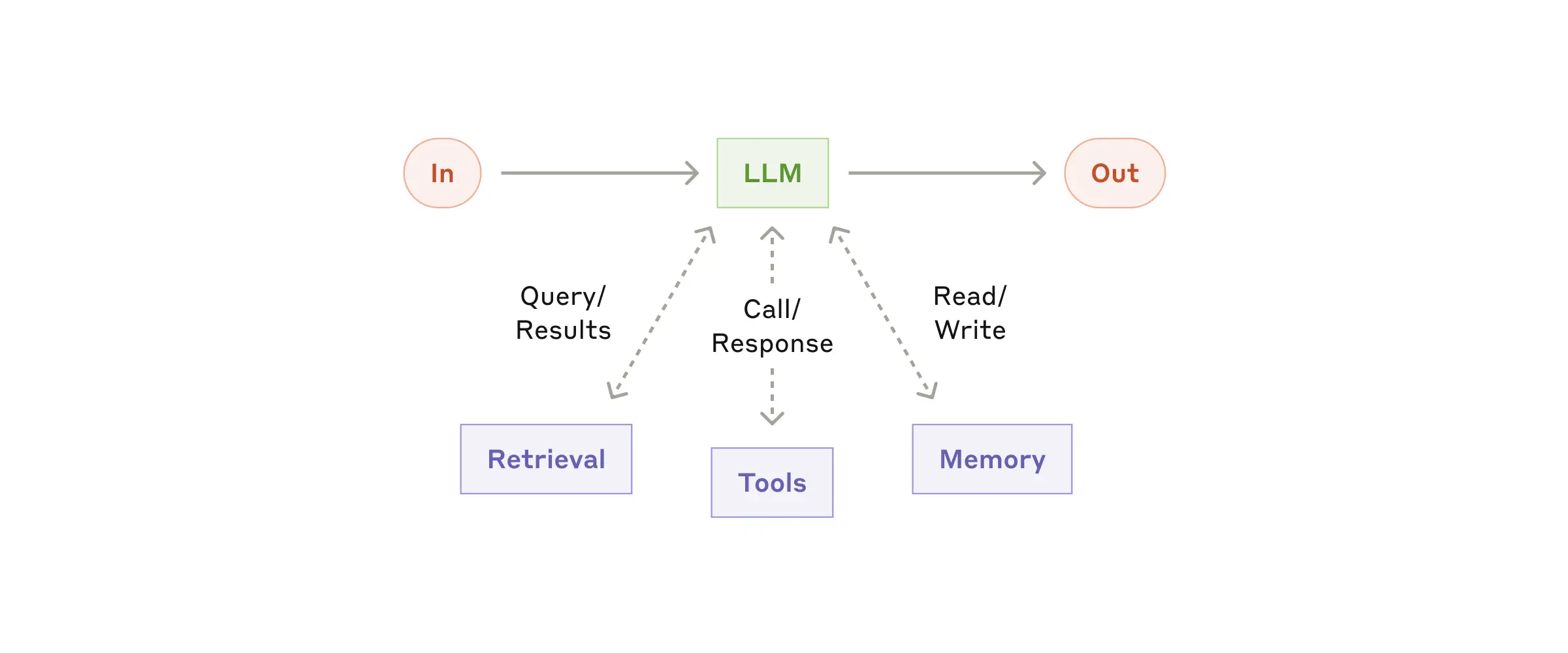
Every agentic system rests on this foundation: an LLM enhanced with retrieval, tools, and memory.
Modern LLMs can actively use these capabilities—generating their own search queries, selecting appropriate tools, and determining what information to retain. The key is designing a clean interface for your LLM to interact with these augmentations.
💡 Best practice
Use the Model Context Protocol (MCP) to integrate tools. It provides a simple standard interface that makes your tools easier for LLMs to use.
Five Core Workflow Patterns
1. Prompt Chaining
Decompose the task into a sequence. Each LLM call processes the output of the previous one. Add programmatic checks at any step.
When: Task has clear subtasks. Goal: trade latency for accuracy.
2. Routing
Classify the input and route to specialized handlers. Each path can have its own prompt and tools.
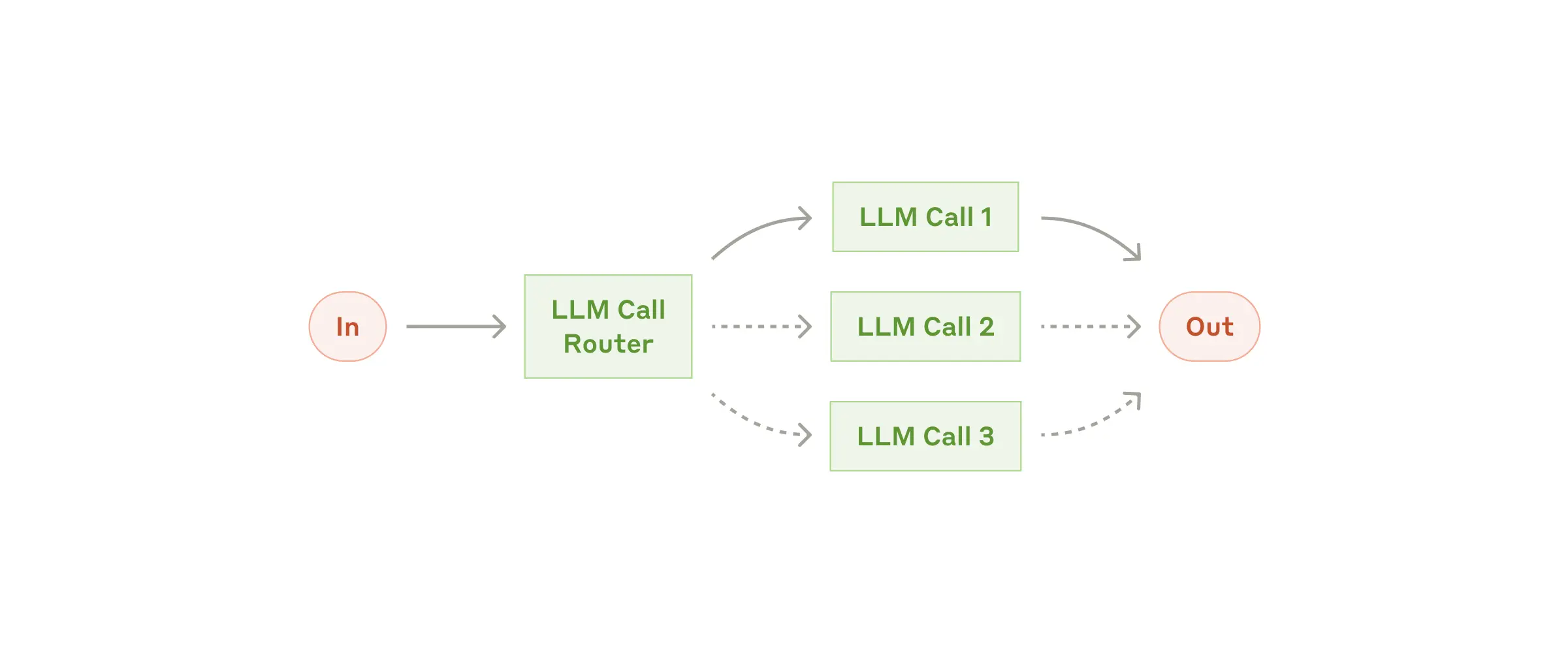
When: Distinct input categories need different handling. Example: route support tickets by type.
3. Parallelization
Run multiple LLM calls simultaneously and aggregate results. Two variations: sectioning (divide task) and voting (multiple perspectives).
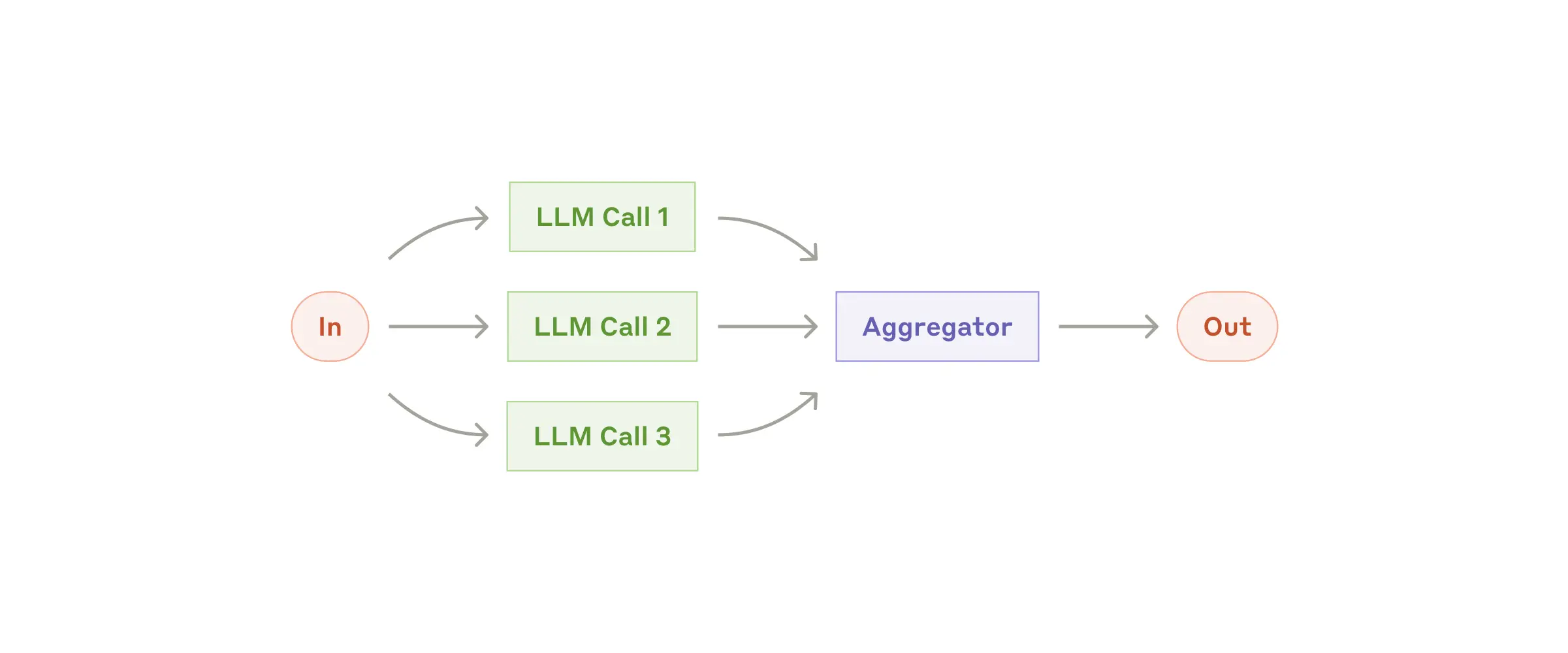
When: Need speed through parallelism, or confidence through consensus.
4. Orchestrator-Workers
A central LLM dynamically breaks down tasks, delegates to workers, and synthesizes results. Unlike routing, subtasks aren't predefined.
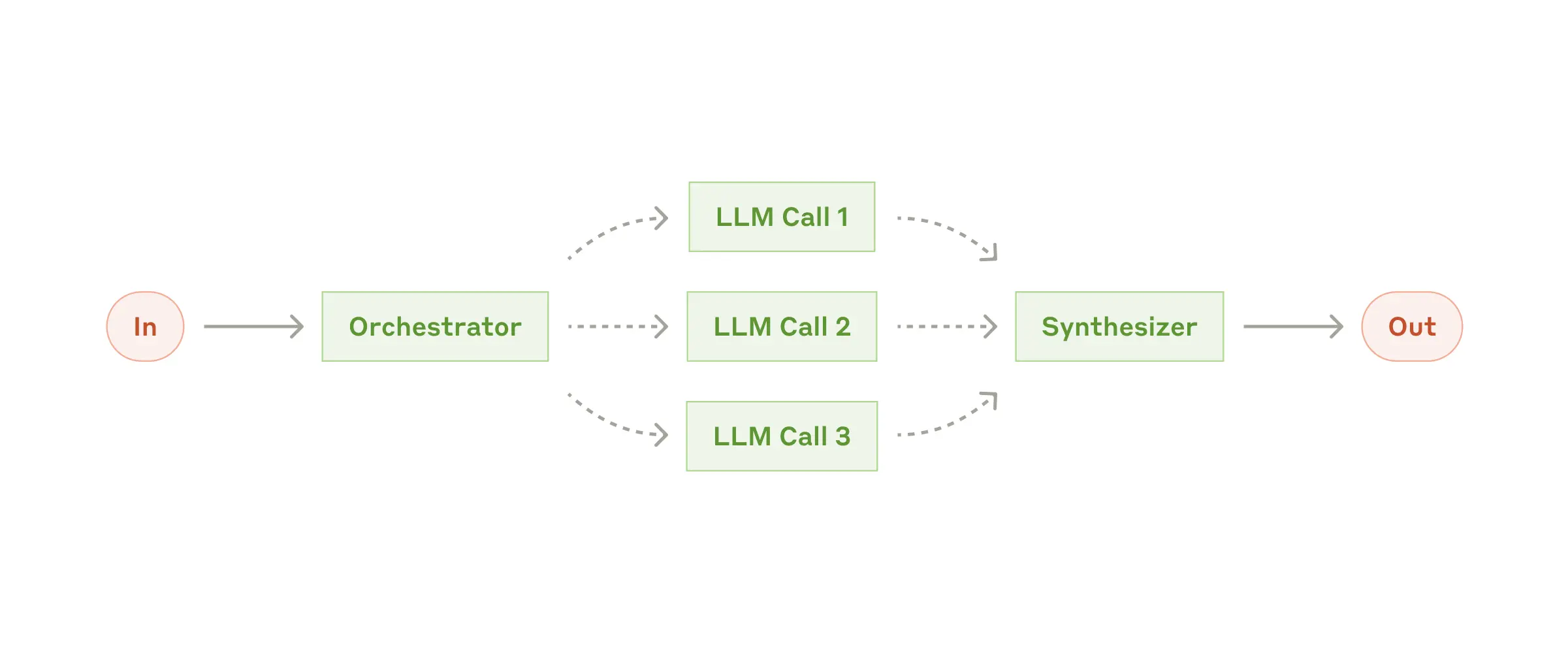
When: Can't predict subtasks upfront. Example: multi-file code changes.
5. Evaluator-Optimizer
One LLM generates, another evaluates and provides feedback. Repeat until criteria are met.
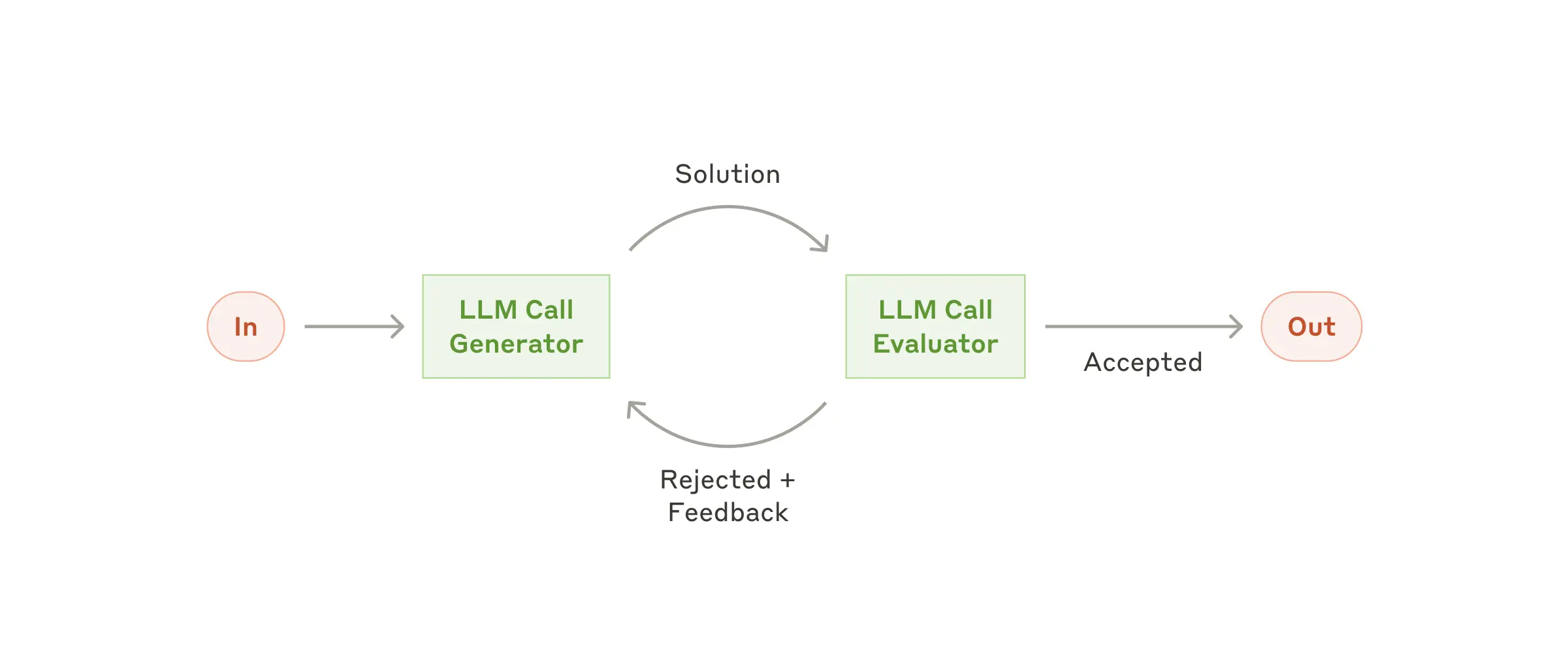
When: Clear evaluation criteria exist. Iterative refinement adds measurable value. Example: literary translation, document drafting.
Autonomous Agents
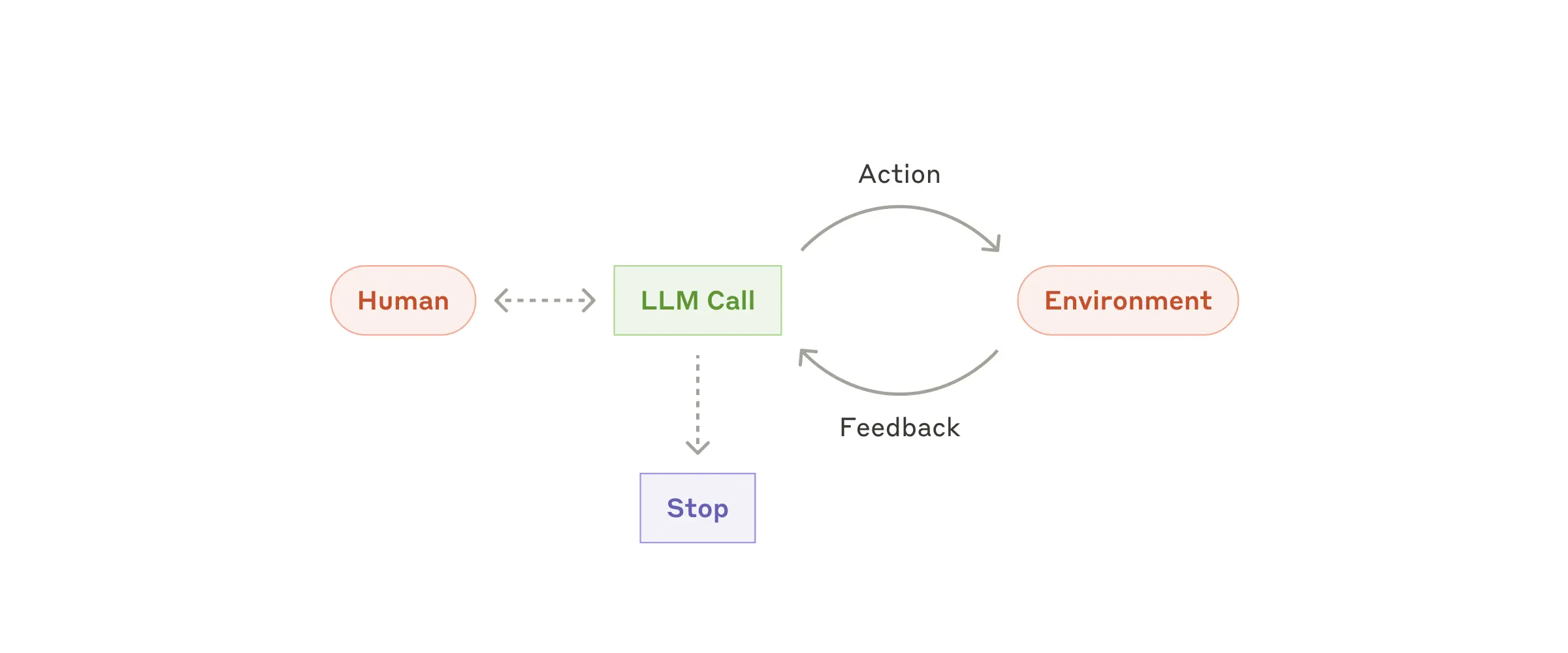
Agents are LLMs using tools in a loop, making decisions based on environmental feedback. Implementation is often simpler than you'd expect.
An agent begins with a task from the user. It plans, executes, observes the result (the "ground truth" from tools or environment), and decides what to do next. It repeats until the task is complete or a stopping condition is met.
Key ingredients
- Clear toolset: Well-documented tools with unambiguous behavior
- Observability: Tool results feed back into the agent's reasoning
- Stopping conditions: Max iterations, success criteria, or human feedback
- Sandboxing: Contain agent actions, especially in early phases
- Guardrails: Monitor for unsafe patterns or excessive loops
⚠️ Agents require careful testing
Test extensively in sandboxed environments before production. Agents can compound errors over multiple steps, and their autonomy requires appropriate guardrails.
When to use agents
- Open-ended problems with unpredictable steps (e.g., coding from requirements)
- Tasks requiring reasoning and planning at scale
- Scenarios where you trust the model's decision-making
- Situations where you can sandbox and monitor safely
Next Steps
Start with a single LLM call and a clear prompt. Add retrieval or tools if needed. Move to workflows when you see a clear sequence. Build agents only when you've exhausted simpler options.
Learn by doing
Pick a task you want to solve. Try the simplest approach first. Only increase complexity when you hit real constraints.
1. Patterns (you are here) → 2. Concepts → 3. Subagents → 4. Agent Teams